 |
 |
 |


With the advent of dual core processors, consumers easily affording multiple "cpus" has become a reality. Although this isn't new news, the integration of older software on such new hardware isn't quite as smooth as just placing a processor into a motherboard. Some single threaded applications don't react correctly. As most have noticed oddities have resulted. In most cases, fixing this problem requires a complete restructuring of an application. Something which developers aren't keen on doing. So what can an end user, a consumer, do about this?
That's where Custom Executor comes into play. Custom Executor allows you to map an application to a processor and design a shortcut so that program only works on that processor. Always.
Sound complicated doesn't it? I assure you it isn't. In Windows XP, at the moment, when you double click on an icon, a message is sent to your shell. Most people have explorer.exe set as the shell. If you don't know what I'm talking about, most likely you have explorer.exe. The shell then executes the desired program. See Figure 1:
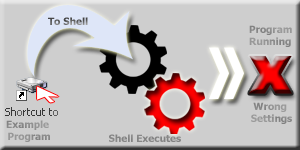
Wait, Wait, What do you mean wrong settings? The program still runs, nothing seems to be "Wrong". Well, yes, in the general sense we're allowing windows to delegate what processor does what work, but that's not what we want. Some applications, games, tools, etc., need just one processor. Constantly switching the affinity in the task manager becomes a pain. Custom Executor alleviates this whole process.
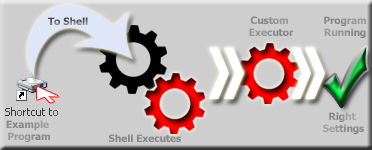
Custom Executor acts like a layer in the program executing system. Since it works behind the scenes the end user doesn't need to know it was running. All you need to do is set it up and it runs any application with your desired setting without a hitch.
Fine, but... I just play my games and go. Why should I bother with all of this? If you play games you have more of a reason to use this application. Games such as Unreal Tournament 99 and Battlefield 2 aren't dual core\multiple processor friendly. With this program the end user can create a shortcut and forget about the settings!
If you encode, that provides another reason to use this. Most of the encoding tools are single threaded meaning that only one processor is in use at one time. With this app you can easily create shortcuts to the same program with different settings and run two jobs at the same time. Utilizing the full power of the system.
Understand? Well if you're still confused, please ask questions in he help forum.